
Registration that follows your event rules
Different audiences, prices, approvals and payment routes usually mean workarounds. In Eventpack your team sets those rules up front, and every registration lands in one attendee record that carries through to check-in, badges and the rest of the event.

Trusted by event teams at
“Eventpack understands how the sector works, where people's values are, and what their needs and objectives are.”

Why teams choose Eventpack for registration
When tickets, approvals, invitations and payments sit in separate tools, someone reconciles lists by hand before the doors open. Eventpack runs them together, so your door team checks people in from the list registration built.
Give each audience the right registration path
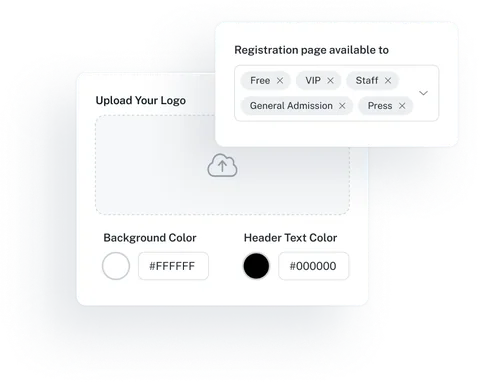
Members, non-members, VIPs, speakers and staff rarely need the same form or price. Set each ticket's price, capacity, sales window and where it sells, then put the right tickets on a branded page or an embedded widget.
- Run early-bird, member and onsite tickets on their own dates and order limits, sold online or as walk-ups at a staffed or self-serve kiosk
- A full registration page on a custom web address, or a widget embedded on your own website, in your colors, font and cover images
- Confirm each registrant with a one-time email code before signup, and hold chosen tickets with an optional cart timer
- Group registration and session signup on the same page, plus promo codes with the promo add-on
A website that sells your event
Build the public event website in Eventpack, next to the tickets and sessions you already run, and send every visitor straight to registration. Where AI is switched on for your organization, it builds pages with you.
Your program on the page
Add sessions, speakers, sponsors and exhibitors as page blocks, inside the same event where your team manages the program and partners.
See the Website BuilderFrom browsing to booking
A registration block leads site visitors to registration, so interest turns into signups without a hand-off to another tool.
See registration pagesAI builds pages with you
Where AI is switched on for your organization, describe the page you need and AI builds it in the editor. Your team edits it like any other page.
See AI in EventpackRun by your event team
The builder sits in the event menu, so the team that runs tickets and sessions also sets up the public site and keeps it in step with the event.
Take card payments or approve invoice requests
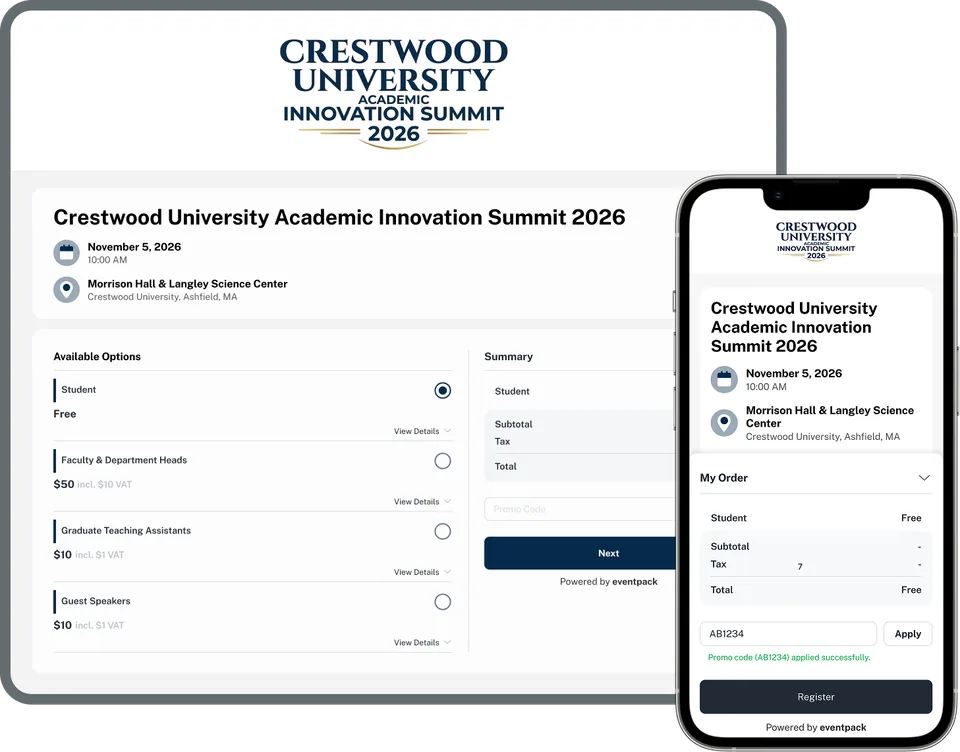
Some buyers pay by card at checkout; others need an invoice for their finance team. Both routes land in the same order, with tax, discounts and refunds recorded alongside.
- Card checkout through Stripe or Authorize.Net with the payment add-on
- Pay by invoice per ticket or session, also with the payment add-on: buyers see your instructions, and your team approves or declines each request with a note
- Tax set once for the event and overridden per ticket or item where needed, and invoices that carry your legal name, tax ID and logo
- Promo codes for targeted discounts, and affiliate codes with their own affiliate portal, where partners sign in by email code to see their links and attributed orders (promo add-on)
One attendee record from signup to the door
Each attendee's answers, order and check-ins sit on one record. Fix it once in the guest list, and finance, marketing and the door team all work from the corrected version.
- Guest list: search, edit, resend the ticket email, transfer a ticket when the rules allow and see each person's check-in history
- Every order shows what was bought, paid, discounted and refunded, and the event dashboard totals registrations, revenue and check-ins
- Registration-page analytics with Google Tag Manager, Meta Pixel, LinkedIn and Bing tags, and an export of page analytics
- Registration and order reports, run now or scheduled to your team as CSV, with custom question columns on the form-field add-on

The cases that usually end up in spreadsheets
Invite-only audiences, applicants to screen, teams registering together, records from a previous system: each has its own workflow in Eventpack.
Custom registration questions
Ask each ticket type only the questions it needs, add one level of follow-ups, and choose where each answer shows: kiosk, attendee portal or networking directory.
See registration questionsTicket visibility and email rules
Choose which tickets appear on each page or invitation, allow or block email domains per ticket, and block free email providers on member-only or staff tickets.
See ticket typesFree-ticket approval
Applicants for a free ticket wait in a queue until you approve, reject, message or move them. With the AI add-on, screening suggests approve, reject or review against your criteria; a person always decides.
See approval and screeningInvitations and RSVP
Give each invitee a unique code tied to a chosen page or ticket, send reminders and see why people declined. Free tickets can also use a lighter accept-or-decline RSVP.
See invitations and RSVPGroup registration
Let one buyer register several people with several tickets on the same registration page, so a company or chapter can sign up its team in one go.
See group registrationBulk import
Bring registrations in from a file and optionally send each person a welcome email with their QR ticket. Invitations, sessions and promo codes each have their own import.
See bulk importFeeds onsite, sessions, email and your CRM
Registrations feed check-in, sessions and email inside Eventpack, and can go out to your CRM and other tools through supported connections. Availability depends on plan and configuration.
What organizers ask before switching
Yes. An invitation ties each invitee, with a unique code, to a specific page and optionally to specific tickets, while a separate public page can stay open to everyone else. For lighter events, RSVP gives invitees a one-click style accept or decline on free tickets. You can import invitees, send reminders and record decline reasons.
Each ticket type carries its own price, capacity, sales window and email rules, and each registration page shows only the tickets you choose. Custom questions can be limited to selected tickets, with one level of follow-up questions. The same answers then appear, or stay hidden, on the kiosk, the attendee portal and the networking directory as you decide.
Yes, on free tickets. Applicants wait in a queue where your reviewers approve, reject, leave a message or move them to another ticket type. AI screening can pre-sort applications against criteria you write; it needs the AI add-on, and a person always makes the final decision. For paid tickets, control who buys with email-domain rules or invitations tied to specific tickets.
Yes, on the tickets or sessions where you allow it, once invoicing is set up for the event. Buyers see your payment instructions at checkout, and your team approves or declines each request from one queue. Card checkout runs through Stripe or Authorize.Net, and both payment routes come with the payment add-on, part of the Enterprise plan by default.
Card checkout runs through Stripe or Authorize.Net with the payment add-on, and buyers pay exactly the ticket price you set, so build the processor's fees into your ticket prices. Eventpack's own usage is covered by your plan and organization credits, and we confirm the details for your package when we talk pricing.
Your event team sets up ticket types, questions, page design, invitations, approval rules, tax and payment settings in Eventpack, with no code. A page publishes on a custom web address, or as a widget on your own site using the embed code and an allowed-website list. Ask us which plan includes public registration pages.
From a file, yes, on every plan. If you keep a supported registration platform, bring its registrations, sessions and answers into Eventpack and run check-in and badges here. Those imports flow one way, into Eventpack, and come with the Enterprise plan or as an add-on, depending on the platform. The Integrations page lists the supported platforms.
Yes, where upgrades and add-ons are set up for your event. Registered attendees can upgrade their ticket in the attendee portal and buy extra items or packages there, or in the Event App where the Event App add-on is on. Each item has its own price, stock and sale window, and you choose which ticket types can buy it.
Put your registration rules to the test
Bring your ticket list, your exceptions and your payment rules. We will show how each one runs in Eventpack, flag anything that needs a different approach, and trace where the attendee record goes next.