
Event emails that follow what people do
Confirmations, check-in emails, invitations, reminders and partner messages go out when the action happens, not when someone remembers. Design them once, test them, send in bulk, and see what was sent, bounced or failed.
Trusted by event teams at
Fewer manual sends, fewer conflicting instructions
Every message is sent from the same record as registration, check-in, sessions and the Partner Portal, so each email reaches only the people it applies to, with far less re-sending by hand.
Sent the moment someone registers or checks in
Pick the event moment, choose who it applies to, and the email goes out every time without anyone on your team pressing send.
- Covers registration, event and session check-in, session signups, invitations and RSVPs with their reminders, plus partner invitations, team-member emails and task reminders.
- Send each email only to the tickets, sessions or tagged attendees it applies to, and attach the ticket PDF so attendees have it to hand at check-in.
- Copy colleagues and set the reply-to address so answers reach the right person, and switch any email to manual when you want to choose the moment.
- Invitation and RSVP reminders wait the number of days you set before they go out.
On-brand emails, tested before the list sees them
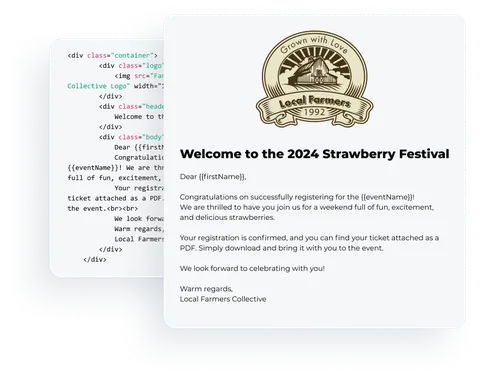
Your emails look like your event, carry each person's details and land in your own inbox for a check before the whole list gets them.
- Drag-and-drop editor or raw HTML, so an agency template works as well as a quick in-house build.
- Merge fields for standard attendee and event data such as first name, company and job title, and a test send to yourself before the real one.
- Bulk send to the whole list; an interrupted run can be resumed without sending duplicates.
- Build with AI (needs the AI add-on) drafts a first design from a short prompt, and you edit, test and send it yourself.
Know what got through, and what didn't
Every send reports what was sent, what failed, what bounced and what drew a complaint, so you can fix delivery problems before the next email.
- Results cover triggered emails as well as bulk sends, so every failed confirmation or bounced reminder shows up in your results.
- Update an attendee's email address on the guest list and resend the ticket email to that one person.

Reach attendees, guests and your own team
Email is one channel. Invite named guests, reach attendees in the Event App and alert your team when key people arrive.
Send confirmations, reminders and bulk updates to attendees and partners, with delivery results for every send. Needs the email add-on; daily volume follows your plan.
Email featuresInvitations & RSVP
Invite named guests to a registration page or ask for a simple accept or decline. Send the invitation and its reminder from Eventpack, and record why someone declined.
See invitations and RSVPEvent App push notifications
Send attendees a message in the Event App now or at a scheduled time, to all or selected tickets and personalized with their details. Needs the Event App add-on.
Event AppCheck-in notifications for your team
Email the colleagues who need to know when a VIP, a speaker or anyone on a chosen ticket type checks in at the event or a session. Needs the email add-on.
Check-in & session accessBuilt on your registrations and sessions
Each email draws on the registrations, sessions and partner records you already keep in Eventpack.
Event email, answered
Delivery, for every triggered and bulk email: what was sent, failed, bounced or drew a complaint, so your team can act on every message that missed someone. For open and click analytics on marketing campaigns, keep your marketing platform and use Eventpack for event operations email.
Emails go out automatically when someone registers, signs up for a session, or checks in to the event or a session. Invitation and RSVP emails can follow up with a reminder after the number of days you choose. Partner invitations, team-member emails and task reminders are triggered the same way, and any of them can be switched to manual sending.
Merge fields cover standard attendee data, such as first name, company and job title, plus event details. Answers to your own registration questions stay out of merge fields, so write those parts to suit every recipient.
It depends on your package. With the custom email sending add-on (ask us which plan includes it) you pick the from-name and a verified sender on each email; changing the visible sender address is a further Enterprise add-on, so confirm which you need with Sales. Custom sending replaces the default registration emails, so build your own versions before you switch it on.
Email needs the email add-on, and daily bulk volume depends on your plan and agreement. Tell us your expected volume and we will confirm the limit for your account before a large send.
Push notifications, yes, with the Event App add-on: a title and message, sent now or scheduled to all or selected tickets. A tap opens the app rather than a link inside the message. For text messages, keep your SMS provider alongside Eventpack.
Build with AI drafts an email design from a short prompt. You then edit, test and send it yourself; nothing goes out without you. It needs the AI add-on.
You can resume it from where it stopped without sending duplicates. That way you do not have to work out who already received it before you continue.
Bring us the emails you send today
We will show how each confirmation, invitation and reminder is triggered, targeted and reported in Eventpack.